Azure Private Link
All material sourced from https://learn.microsoft.com/en-us/training/modules/introduction-azure-private-link/.
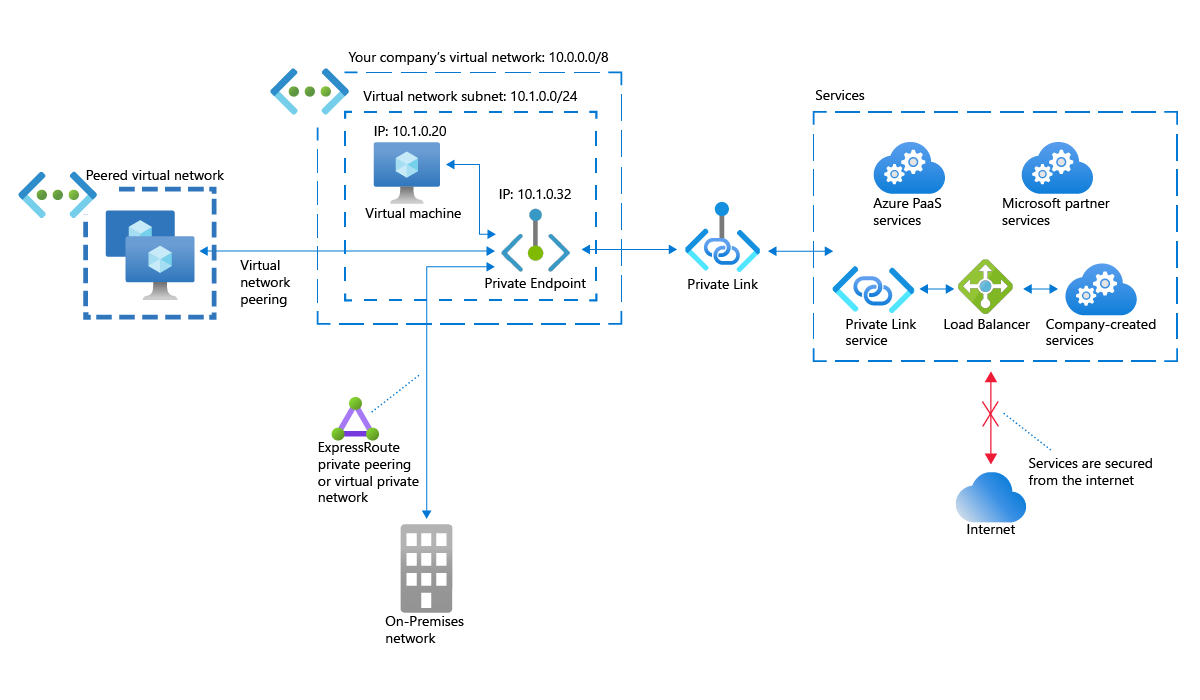
- Normally, Azure resources find each other using the public internet
- They give three examples:
- Peered virtual network
- On-premises network connecting via ExpressRoute
- Side note: The ExpressRoute documentation specifically says it doesn't go over the public internet?
- https://learn.microsoft.com/en-us/azure/expressroute/expressroute-introduction
- "ExpressRoute connections offer more reliability, faster speeds, consistent latencies, and higher security than typical connections over the Internet, because they don’t go over the public Internet."
- Side note: The ExpressRoute documentation specifically says it doesn't go over the public internet?
- Customer's virtual network that connects to your own company's virtual network
- But access over the public internet may lead to security concerns
- Private Link replaces public endpoints with private network interfaces
- Think of it as adding both resources that you are trying to connect to the same virtual network
- But instead of connecting via the public internet, it goes over the Azure backbone network
- This is called Azure Private Endpoint
Azure Private Endpoint
- Connects virtual networks to Azure services in place of public endpoint
- Charged per hour and per GB of inbound/outbound traffic
- Azure Private Link Service is different from just Private Link (see below)
- Allows your customers to connect to your Azure services via Private Link and is free
Benefits
- Independent of which Azure virtual network you are part of
- Cross-region, global
- Works regardless of tenancy (on-prem, hybrid, Azure cloud)
How does it work?
- Uses Microsoft Azure backbone instead of internet
- Does this by switching from public to private endpoint
- So add Azure Private Endpoint to network configuration to create private connection between virtual network and specified Azure resource
- Private Endpoint will use up an unused private IP from a specified subnet in the virtual network
- Ex. if 10.1.0./24, and 10.1.0.32 isn't used by anyone, will use that address for a specified Azure service
- Almost like bringing the remote Azure service into the subnet
- You don't need to use that IP to name the service if you configure it to integrate with your private DNS zone
- That will let you assign a FQDN (like
myazureresource.table.core.windows.net) to that IP and use it for access
- That will let you assign a FQDN (like
- Private Endpoint will use up an unused private IP from a specified subnet in the virtual network
Key Points
- Maximum of 1000 Private Endpoint interfaces per virtual network
- Maximum of 64000 Private Endpoint interfaces per Azure subscription
- Maximum of 1000 Private Endpoint interfaces to same Private Link resource
- Not recommended to map multiple interfaces to a single resource due to potential DNS conflicts
- Connections are one-way, so only clients can connect to an interface
- Deployed interface is read-only and the resource and IP can't be changed
Service Endpoints vs. Private Endpoints
- Service endpoint restricts connections from specific virtual networks, but still happen over public endpoints
Azure Private Link Service
- If you want to serve an Azure app, can hide it behind Private Link for your customers
- Requires Azure Standard Load Balancer to be attached (not Basic)
- Issued an alias with the format prefix.guid.suffix
- prefix is your custom name
- guid is global unique ID generated by Azure
- suffix is \<region>.azure.privatelinkservice with \<region> filled in where the Private Link Service is hosted
- Share alias to allow them to connect
Key Points
- Must be deployed in same region as Azure Standard Load Balancer and the virtual network of the service's host
- Max 800 Private Link Service resources per Azure subscription
- Max 1000 Private Endpoint interfaces to map to a single Private Link Service resource
Private Link Use Cases
- Connect to Azure PaaS offerings in your virtual network
- Secure traffic between company network and Azure cloud
- Disconnect Azure PaaS offerings from the internet
- Access Azure PaaS resources across networks
- Offer private access to Azure services to customers